Author Archives: CPstaffing

The Keys To Creating a Great LinkedIn Profile

LinkedIn

By: Kaitlyn Neese

Like a resume, your LinkedIn page has the power to make or break a job opportunity. Everyone has different views and opinions on LinkedIn, but there are several concepts that you can use TODAY to make your LinkedIn profile the best it can be.

The Basics

Your LinkedIn profile is a marketing tool that allows you to sell yourself to prospective employers. When employers search your name, they will see a shortened version of your profile. Usually this shortened version contains your name, industry, job title, and picture. Therefore, make sure that you are making the statement that you intend to make with your shortened version. Your picture should be professional and your information should be clear, correct, and concise.

Your Summary

The Summary section is arguably the most important part of a LinkedIn profile because it allows you to explain who you are and why people should be interested in you. You should use as much of the allotted space as possible to make a great first impression. Try to include as much tangible data as possible in this section. For example, instead of writing that you have experience with customer service, write that you answered an average of 10 calls per hour and received so many employee of the month awards for your attentiveness to customers. Set yourself up in a way that potential employers will be interested in you; this is your chance to shine!

Endorsements

Endorsements are a key element of a LinkedIn Profile because they allow you to back up your skills with people who have seen your skillset. Because of this, your endorsements should be primarily be authored by managers, leadership, and coworkers, not friends or relatives. A few endorsements from these people are okay, but it will look suspicious if there are too many endorsements from those out of your industry.

Your Connections

While it is good to have a large amount of connections on LinkedIn in order to increase your visibility, too many connections can be suspicious. You should not add people that you do not know or have nothing in common with just for the connection. However, it is recommended to list all schools you have attended including your high school. This is an opportunity to connect with old classmates and expand your reach of people who you may actually benefit from on LinkedIn.


CPSS is Awarded WNY’s Most Admired Companies 2014

The Computer Plus Staffing Solutions team.

Computer Plus Staffing Solutions was pleased to accept Buffalo Business First’s 2014 award as one of WNY’s “Most Admired Companies”.

CPSS was one of 18 companies awarded. Organizations are chosen each year based on industry innovation, community involvement, employee satisfaction and civic giveback.

Some highlights from the article include our success in bringing individuals back to Buffalo for employment opportunities as well as our contribution to Dreams to Memories, a family wish-granting charity.

Check out the full article on Business First’s website!

How to Think Like a Freak

Beth

Beth Courtney

Sr. Sourcing Specialist at ComputerPeople

A few years ago I read an interesting and thought provoking book called Freakonomics.  Written by Stephen J. Dubner and Steven Levitt, it exposes the hidden side of just about everything.  It is a fun book to read and covers topics like “What do Schoolteachers and Summa Wrestlers have in Common?” and “Why Do Drug Dealers Still Live With their Moms?” In full disclosure, one of the authors, Stephen J. Dubner, is my youngest brother.  That being said, I would enjoy this book even if we weren’t related.  It challenges the reader to think outside the box and look at the world from a different perspective. The authors use unconventional analysis to come up with new ways of looking at data from philanthropy to sports to politics to current events.

For those of us whose brains don’t normally analyze things in an “outside the box” fashion, Dubner and Levitt’s latest book, Think Like a Freak provides a look inside their thought processes.  They teach us all to think a bit more productively, more creatively, more rationally—in other words, to think like a Freak.

Some of the steps toward thinking like a Freak as outlined in this book include:

  • First, put away your moral compass—because it’s hard to see a problem clearly if you’ve already decided what to do about it.
  • Learn to say “I don’t know”—for until you can admit what you don’t yet know, it’s virtually impossible to learn what you need to.
  • Think like a child—because you’ll come up with better ideas and ask better questions.
  • Take a master class in incentives—because for better or worse, incentives rule our world.
  • Learn to persuade people who don’t want to be persuaded—because being right is rarely enough to carry the day.
  • Learn to appreciate the upside of quitting—because you can’t solve tomorrow’s problem if you aren’t willing to abandon today’s dud.

One of my favorite parts of this book is their description of how children see the world.  Children have such a natural curiosity about everything which leads them to ask so many questions. They explain that children don’t have a set point of view and are eager to learn by asking questions.  Adults often dismiss these questions when it might be valuable to see the world through a child’s eyes and challenge opinions or thoughts that are set in stone in our adult minds.  Overall, Think Like a Freak is a funny and intriguing book that serves as a good resource to learn to think differently and to see problems from more than one preconceived point of view.

Check out the Freakonomics website here!

_________________________________________________________________________

Beth is a Senior Recruiter and Sourcing Specialist at Computerpeople with over 20 years of experience sourcing hard to fill technical positions. Her primary focus is finding exceptional talent in software development, networking, database management, web development, business analysis, project management, help desk/tech support, data architecture, Information Security and IT Management.

Note from the President; Cindy Neese on Leadership

Cindy Neese

President of Computer Plus Staffing Solutions 

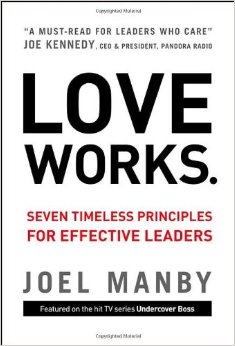
I recently read a book called Love Works by Joel Manby.  This book shares the seven timeless principles for effective leaders. Many leaders could never imagine leading a company with Love – the verb not the emotion.  I am talking about actions, not feelings.  The set of behaviors that people use to build a healthy relationship with someone regardless of how they feel.

After reading this book, I discovered that this is the way I have managed my staff through the years at Computer Plus Staffing Solutions.  Patience, kindness, trustworthiness, unselfishness, truthfulness, forgiveness and dedication are the key principles of leading with Love.  When you care about the people that work for you, and lead with Love, you might be surprised with the results.

I would recommend this book to all leaders. It will definitely give you a different perspective on management and you may start earning the support of your team in ways you have only dreamed of!

Check out Joel’s website for more information on Love Works.

________________________________________________________________________________

Cindy is the President/COO of Computer Plus Staffing Solutions. She has 30 years of staffing experience focused on Information Technology. Computer Plus Staffing Solutions has been recognized as a leader in Western New York’s staffing industry for the past 40 years. 

Interview Anxiety Complex

By: Faith Drew

Sweaty palms, churning stomach, bated breath – these are just a few of the symptoms resulting from IAC: Interview Anxiety Complex.

Good news is, there’s a cure!

If you’ve got the interview blues here is what I would suggest:

1) Prior to the day of your interview, write down a minimum of three “success stories”. These could be achievements in your current or previous job, or successes in school or athletics. Having these on hand will not only give you confidence, it will allow you to quickly answer your interviewer’s questions with specific examples.

2) “Dress for success” is an old cliche, but holds much truth. Dressing differently than you regularly would triggers your mind that something special is happening, which inevitably effects your behavior. The way you dress depends on the role you are interviewing for, but generally speaking, for men: a long-sleeve, button-down shirt and tie, tucked into slacks with a belt is the minimum dress requirement acceptable for an interview. For women: a long-sleeve tucked into slacks or a skirt no shorter than three inches above the knee is appropriate. Be sure that the neck line is no lower than four finger-widths below the collar bone. For both men and women: minimal accessories! No more than two rings (one on each hand), one bracelet or watch, etc. This may seem excessive, but the more conservative you dress, the more YOU will stand out as opposed to your distracting style of dress.

3) Sit or stand up straight. Slouching triggers relaxation which is not what you want to portray to your potential employer. Sitting up will give you confidence, similar to the way your dress will.

4) Think of some things you are thankful for. This may seem odd, but it was my biggest interview anxiety cure. Being reminded of the people and gifts in my life that were more valuable than any interview could be, put it into perspective. While I still recognized the importance of the interview, this act helped calm my nerves by laying out the bigger picture.

So, if you or someone you know is suffering from IAC, try these four holistic cures before seeing a doctor.

Prezi, the future of presenting?

By: Kaitlyn Neese

If you work in an environment with a lot of presentations, you’ve probably heard of Prezi. It is gaining popularity among the younger generation of the workforce, but I imagine that it is soon going to be utilized by all ages.

If you are unfamiliar with Prezi, it is a free, web-based, more visually appealing version of PowerPoint. It is pretty simple to use and the final product always looks stunning. Prezis are typically much more interesting than PowerPoints, and even the most boring information comes to life with Prezi.

Prezi is new and different. It is fun and it looks so much smoother and more sophisticated than PowerPoint.

So what’s the problem? Why isn’t everybody and their mother flocking to download Prezi and kick the outdated PowerPoint to the curb forever? Long-time PowerPoint fans have a hard time retraining their brain to effectively use Prezi.

Personally, I have become comfortable with the setup of Prezi, but will admit that I have had technical difficulties in the past. Saving presentations has been an issue, and sometimes it takes a while to open up a saved presentation. This can be awkward if you are in front of a group and about to present.

A complaint of Prezi audiences is that it can be distracting. Listeners may be so involved in how gorgeous your presentation looks that they do not hear a word you say. So that definitely defeats the purpose.

So what presentation aid to I prefer to use? I’m going to have to say Prezi, despite its downfalls. Though I will admit Prezi can be distracting and confusing at first, the seasoned Prezi user will learn the tricks of the trade and be able to create excellent presentations. PowerPoint is just too mundane, outdated and limited.

So yes, I believe that Prezi is the future of presenting. If you are uncomfortable with Prezi now, you might as well get used to it. Although your hesitations are probably valid, Prezi is eventually going to be everywhere, so I suggest getting ahead while you still can!

What do you think of Prezi? Are you a loyal PowerPointer? Why?

My favorite FREE apps for Business People

By: Kaitlyn Neese

There are thousands of apps out there, all claiming to simplify your life in some way or another. Many of these apps are impractical, but some really are must-haves for the time-constrained business person. Here are three of my favorite apps that you should try!

Evernote


Seriously. This app rocks.

Evernote is the best app for note-taking and research in my opinion. Also, the collaboration aspects of this app make it great for businesses or groups working on a project.

When you create a notebook in Evernote, you have the option to make it private or share it with a team, and that notebook will also sync across all of your devices so that you can access anything at any time (PC, Mac, iPad, smart phone, etc).

This app has been referred to as a “virtual filing cabinet” because you can add tags to your files in order to find something you have saved in just a few clicks. One of the best parts of this app is that it is extremely easy to snip content from the web and add it to your notebooks- making research documentation simple and accessible.

There is a free version and a pro version for $4.99/month. The free version is really awesome, but you may want to try out the pro version at some point as well.


 Wunderlist

Are you one of those people who cannot stop making lists? I am. Sometimes, if I accomplish something that wasn’t on one of my lists, I will put it on a list just so I can cross it off. Crazy, right?

Well, if you are anything like me, you have probably tried multiple list apps, hoping to someday find the perfect app to satisfy all your list-making needs. I finally found that app with Wunderlist.

The free version is great. You can create as many lists as your heart desires for different categories. I use Wunderlist for homework lists, grocery lists, wish lists, and work task lists. Wait – was that a list…? Sorry.

Anyway, I use this app for remembering all the stuff I have to do TODAY, but it can also be used for a more long term to-do list if that works better for you.

Another cool thing is that it syncs across my devices, so I can add and check off tasks from my laptop or my iphone. It is quite handy.


Expensify

Okay, so I have to admit that my company does not actually use this app. But I wish we did. It is really fantastic.

Many of my previous employers have complained about how frustrating it is when people lose receipts from business lunches or do not record expenses accurately. Especially when they are the ones that reconcile the receipts. This app totally eliminates that problem by easily allowing you to digitally store all expense information when traveling.

With this app, you can quickly add cash expenses, card expenses, record mileage from travel, and store photos of receipts so that you will never lose one again. Additionally, this app is really helpful to managers because they can approve expenses, reimburse employees right from their phone, and set max expense limits for different categories. Managers can view your entries right from their device or set the app to automatically integrate with Excel, QuickBooks, Xero, Netsuite, Dynamics, Salesforce, FinancialForce and more!

Another cool aspect of Expensify is the ability to log and bill hours to clients using the time entry feature.

Oh yeah, and it’s FREE.

What apps does your company use that you find helpful?